Terminal
A terminal is a screen and a keyboard in one device, like a VT100 on a serial line. A program writes text to it, with escape sequences to move the cursor and set colors, and reads back the keys typed.
Facts
| | |
|—|—|
| Type | terminal |
| Tiers | 1 (50 by 16, monochrome), 2 (80 by 25, 16 colors), 3 (160 by 50, every color and sixel pictures) |
| Interrupt | Raised while keys wait to be read |
| Power | 10 W while powered, and a little per write |
| Info | tier, width, height, colors |
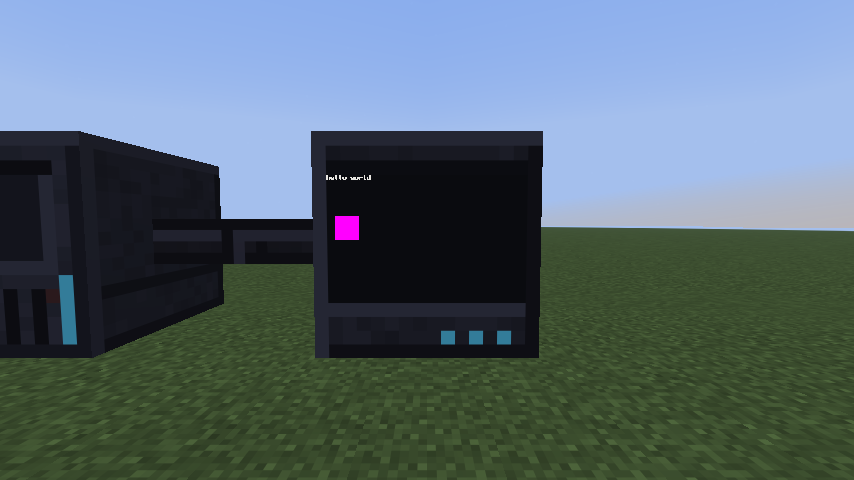 A tier 3 terminal showing text and a sixel picture.
For the block you place and look at, see Screen.
In mcos
A program uses a terminal through its tty, as on Linux: its standard input, output and error,
/dev/tty (the terminal of the process that opens it) and /dev/console. The kernel’s line
discipline sits in between: it echoes what you type, edits the line, turns Ctrl+C into a signal and
\n into \r\n on the way out. A program draws by writing escape sequences to its tty (see
What a terminal understands), and reads keys from it, a line at a
time or, with the line discipline’s raw mode (stty, TCSETS), as they come. The tty’s ioctls
(TCGETS, TCSETS, TIOCGWINSZ for its columns and rows) are in the sys library.
Terminals are grouped into the console: mcos reads the keys typed at any of them and writes to
all of them through /dev/console. The console’s size is the largest every terminal in the group
can show. See /dev.
Each terminal also has a file of its own, /dev/terminal0 (terminal1 for the next):
-
Read: it has no data of its own, so a read says what it is, a line each:
type terminal id id:3f2a... path - label - methods getSize read write - Write: refused. Opening it to write fails with
EACCES; a program writes to the terminal through itswriteioctl. - Poll: always ready for
IN(that text). Ready forPRIwhile the terminal has news: keys arrived since the file was last read or asked an ioctl. - ioctls: the terminal’s methods below, by name, with their arguments. A method that answers
nothing gives
true; a failure isnil, its message andEINVAL, orENODEVonce the terminal is gone.setLabelsets its label, as on every device file.
local columns, rows, mostColumns, mostRows = sys.ioctl(fd, "getSize")
A write through the file’s ioctl skips the tty: it reaches that one terminal, raw (no \r added),
and works from a program with no terminal of its own (a service). Every terminal is in the console’s
group, so what the console writes shows there too, and a read through the ioctl races the console
for the keys: each key goes to whichever reads first. Read keys through the tty.
Methods
write(text) → nothing
Sends text to the terminal. Escape sequences in it are decoded by the terminal itself. Writes are
raw: a line feed only moves the cursor down, unless the program turns on new line mode (ESC[20h),
so write \r\n for a new line. Each write costs a little power.
read([max]) → string or nil
Takes the bytes waiting, at most max of them, as a serial line gives them: the keys typed at this
terminal (an arrow key is its escape sequence’s bytes among the others) and the terminal’s answers to
reports (such as the cursor position). Keys are never split; a read gives at least one key even if it
is longer than max. With nothing waiting, it gives nil.
getSize() → columns, rows, maxColumns, maxRows
The size now, then the largest it can be made (in the console’s group, the group’s largest). A
program resizes it with xterm’s sequence ESC[8;rows;cols t, up to the largest; ESC[18t reports
the size and ESC[19t the largest. resize does it from the shell.
Events
A terminal raises its interrupt while it has bytes waiting. The queue holds at most 256 keys and reports; past that, new keys are dropped. Keys typed while no program runs on the computer are dropped too.
Typing comes from the screen view: only the terminal a player has open gets the keys.
What a terminal understands
All tiers use the same VT decoder, and differ in colors:
| Tier | Model | Colors | Answers Device Attributes (ESC[c) with |
|---|---|---|---|
| 1 | VT102 | one phosphor, shown as intensities (bold, normal, reverse) | ESC[?6c |
| 2 | VT525 | the 16 basic colors (others show as the nearest) | ESC[?65;22c |
| 3 | VT340 | every 24-bit color, and sixel pictures (DCS q) |
ESC[?63;4;22c |
It understands the common xterm subset: cursor movement, erasing and editing, scroll regions, SGR
(bold, reverse, 16, 256 and 24-bit colors), the alternate screen, the cursor’s shape, device status
and cursor position reports, and the kitty keyboard protocol (flags 1, 2 and 8). Anything else is
parsed and ignored. A BEL (\a) rings the terminal’s bell at its block.
Every tier reads text as UTF-8, as terminal emulators do today: a program writes UTF-8 bytes, and
the terminal shows the characters (a byte that isn’t UTF-8 shows as �). Each character takes the
cells its width says, as glibc’s wcwidth gives it (each code point its own width, as xterm’s):
- most characters, accented letters, box drawing: one cell;
- CJK and most emoji: two cells;
- combining marks (an accent written after its letter) and format characters (a zero-width joiner): none, they go on the character before.
The table is mcos’s /usr/share/wcwidth, so a program that measures text (mcos’s line editing) and
the screen agree. Keys typed and pasted reach programs as UTF-8. The DEC character sets work too:
ESC ( 0 puts DEC’s line drawing in G0 (ESC ( B back to ASCII, ESC ( A the UK set), ESC ) 0
in G1, and SO (\14) and SI (\15) shift between them; lqqk in line drawing is ┌──┐.
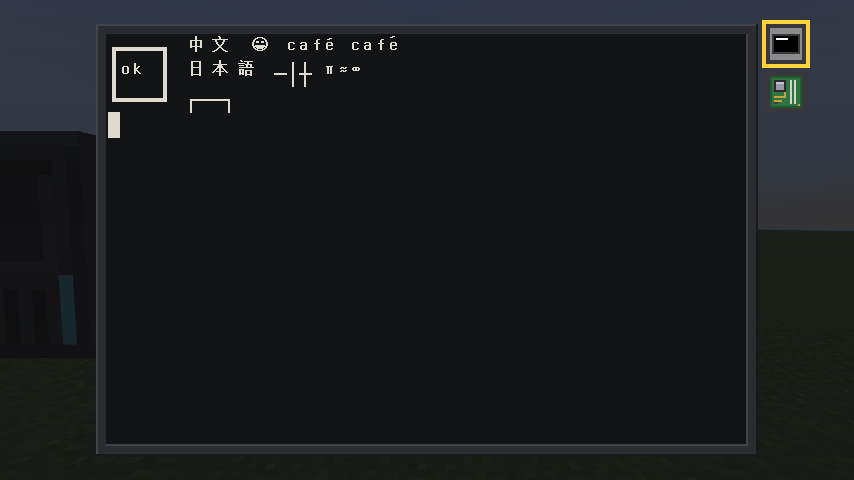 UTF-8 on a tier 3 screen: wide characters in two cells, an accent combined, DEC’s line drawing.
Box drawing (U+2500 to U+257F), block elements (U+2580 to U+259F) and braille (U+2800 to U+28FF) aren’t drawn from the font: the terminal draws them itself, filling their cells, as terminal emulators do, so lines join from cell to cell (light, heavy, double, dashed, rounded and diagonal), blocks and shades meet, and braille’s dots sit on their grid, for drawings and charts made of text.
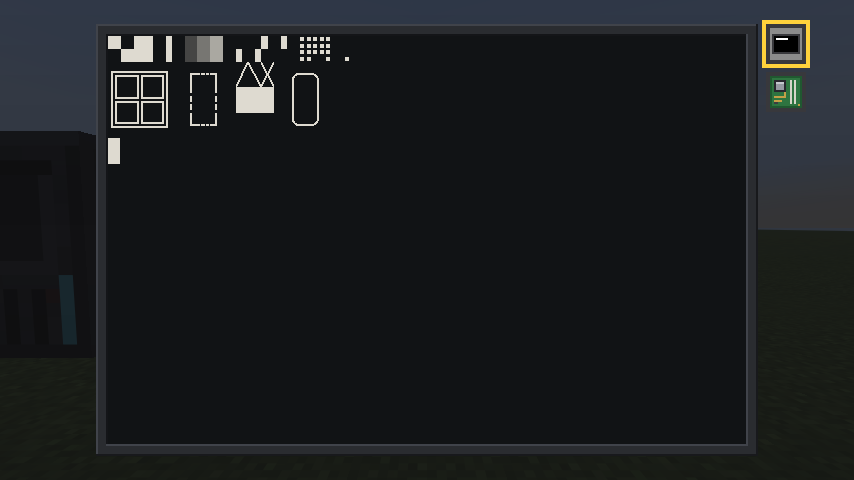 Characters the terminal draws itself.
Some sequences a program uses most (ESC is "\27" in Lua):
| Sequence | Does |
|---|---|
ESC[row;colH |
moves the cursor (from 1;1, the top left) |
ESC[2J |
clears the screen |
ESC[K |
clears to the end of the line |
ESC7, ESC8 |
saves the cursor, puts it back |
ESC[0m |
plain text again |
ESC[1m, ESC[7m |
bold, reverse video |
ESC[31m to ESC[37m, ESC[41m to ESC[47m |
a text color, a background color |
ESC[38;2;r;g;bm |
a 24-bit text color (48 for the background) |
ESC[?25l, ESC[?25h |
hides the cursor, shows it |
ESC[?1049h, ESC[?1049l |
the alternate screen (a full-screen program’s), and back |
ESC[6n |
asks where the cursor is: the answer, ESC[row;colR, comes back as typed |
/usr/bin/vtdemo.lua shows every tier’s colors and a picture.
The mouse
In a screen’s view the mouse works as on xterm: nothing reaches a program until it asks, with the same modes, and then each click, release, wheel notch or move (as it asked) comes as typed input, at the cell it was over (columns and rows from 1).
| Sequence | Reports |
|---|---|
ESC[?9h |
presses only (X10’s), no modifiers |
ESC[?1000h |
presses, releases and the wheel |
ESC[?1002h |
those, and moves while a button is held (drags) |
ESC[?1003h |
those, and every move |
ESC[?1006h |
reports in SGR’s encoding: ESC[<b;x;yM, m for a release |
ESC[?…l |
turns one off; ESC c (a reset) turns them all off |
Without 1006, a report is X10’s: ESC[M and three bytes, the button, the column and the row,
each 32 past its number (so a position past 223 can’t be reported). The button: 0 left, 1 middle,
2 right (3: a release, in X10’s encoding), 64 and 65 the wheel up and down, plus 32 for a move;
Shift adds 4, Alt 8, Control 16. While no program tracks the mouse, the wheel scrolls the screen
view back over what scrolled off.
-- Click on the screen: each click (and wheel notch) in the screen view is reported where it was,
-- until q is typed. The program asks the terminal for the mouse as on any xterm: ESC[?1000h
-- (presses and releases), ESC[?1006h (SGR's encoding: ESC[<button;column;rowM, m for a release),
-- and reads them as typed input, raw.
local sys = require("sys")

local saved = io.popen("stty -g"):read("l")
os.execute("stty raw -echo")
io.write("\27[?1000h\27[?1006h", "click anywhere (q quits)\r\n")
io.stdout:flush()

local BUTTONS = {[0] = "left", [1] = "middle", [2] = "right", [64] = "wheel up", [65] = "wheel down"}
local pending = ""
while true do
  pending = pending .. assert(sys.read(0, 64))
  if pending:find("q", 1, true) then
    break
  end
  -- Every whole report in what's come so far.
  for button, column, row, kind in pending:gmatch("\27%[<(%d+);(%d+);(%d+)([Mm])") do
    local what = BUTTONS[tonumber(button) & ~28] or ("button " .. button) -- (28: the modifiers' bits)
    io.write(what, kind == "m" and " released" or "", " at column ", column, ", row ", row, "\r\n")
  end
  pending = pending:match("\27%[<[%d;]*$") or "" -- (keep a report still coming)
  io.stdout:flush()
end

io.write("\27[?1006l\27[?1000l")
os.execute("stty " .. saved)
Lines that scroll off the top of the main screen are kept, 200 of them, and the screen view scrolls back over them. They are lost when the block unloads.
Examples
A clock in the corner of your terminal, drawn with escape sequences written to the tty while you
work (start it with &):
-- A clock in the top right corner of the terminal, kept there while you work: lua terminal-clock.lua &
--
-- A program draws on its terminal by writing escape sequences to it, as on any VT100 or xterm:
-- ESC 7 saves the cursor, ESC [ row ; column H moves it, ESC [ 7 m turns on reverse video, ESC [ 0 m
-- turns it off, and ESC 8 puts the cursor back where it was, so whatever you are typing is not
-- disturbed. The terminal's width comes from the tty (TIOCGWINSZ), asked again at each redraw, so
-- the clock follows a resize. It redraws once a second of game time (sys.sleep blocks meanwhile).
local sys = require("sys")

local ESC = "\27"
local EVERY = 1             -- seconds between redraws
local FORMAT = "Day %d %R"  -- os.date's: the world's day and its time, hours and minutes

local TTY = 1  -- standard output: the terminal it was started from
assert(sys.isatty(TTY), "the clock needs a terminal")

while true do
  local columns = sys.ioctl(TTY, "TIOCGWINSZ")
  local text = " " .. os.date(FORMAT) .. " "
  sys.write(TTY, ESC .. "7" .. ESC .. "[1;" .. math.max(1, columns - #text + 1) .. "H"
    .. ESC .. "[7m" .. text .. ESC .. "[0m" .. ESC .. "8")
  sys.sleep(EVERY)
end
The terminals on the bus and their sizes, from each one’s getSize ioctl:
-- List the terminals on the bus, with their size now and the largest each can be made:
-- lua terminal-list.lua
--
-- sys.devices() gives every device the kernel knows, and each terminal has a file in /dev
-- (terminal0, terminal1...). The file has no data of its own (a read says what the device is), but
-- its ioctls are the terminal's methods, so getSize is one call on it.
local sys = require("sys")

print(("%-12s %-9s %-9s %s"):format("NAME", "SIZE", "LARGEST", "LABEL"))
for _, device in ipairs(sys.devices()) do
  if device.type == "terminal" then
    local fd = assert(sys.open("/dev/" .. device.name))
    local columns, rows, mostColumns, mostRows = sys.ioctl(fd, "getSize")
    sys.close(fd)
    if columns then
      print(("%-12s %-9s %-9s %s"):format(device.name, columns .. "x" .. rows,
        mostColumns .. "x" .. mostRows, device.label or "-"))
    else
      io.stderr:write(device.name, ": ", tostring(rows), "\n")  -- (rows holds why it failed)
    end
  end
end
A notice in the middle of a screen, written through the terminal’s own write ioctl:
-- Put up a notice on a screen: lua terminal-sign.lua terminal0 "Back in five minutes"
--
-- The program writes to the terminal itself, through its file's write ioctl (the terminal's
-- method), not through a tty: so it works from a service with no terminal of its own too. A
-- terminal's writes are raw (no tty turns "\n" into "\r\n"), and the program places every line
-- with the cursor-position sequence anyway. It clears the screen, draws a framed box in the middle
-- in bright yellow on blue, and hides the cursor. getSize says how big the screen is.
local sys = require("sys")

local ESC = "\27"
local COLORS = ESC .. "[1;33;44m"  -- bold, yellow text, blue background
local PLAIN = ESC .. "[0m"
local PADDING = 2                  -- spaces between the message and the frame

local name, message = arg[1], arg[2]
if not (name and message) then
  io.stderr:write("usage: terminal-sign.lua TERMINAL MESSAGE\n")
  os.exit(2)
end

local fd = assert(sys.open("/dev/" .. name))
local columns, rows = sys.ioctl(fd, "getSize")
assert(columns, rows)

local width = math.min(#message + 2 * PADDING + 2, columns)
message = message:sub(1, width - 2 - 2 * PADDING)
local inner = width - 2
local top = (rows - 3) // 2 + 1
local left = (columns - width) // 2 + 1

local function at(row, text)
  return ESC .. "[" .. row .. ";" .. left .. "H" .. text
end

local edge = "+" .. ("-"):rep(inner) .. "+"
local middle = "|" .. (" "):rep((inner - #message) // 2) .. message
middle = middle .. (" "):rep(inner + 1 - #middle) .. "|"

assert(sys.ioctl(fd, "write", ESC .. "[2J" .. ESC .. "[?25l" .. COLORS
  .. at(top, edge) .. at(top + 1, middle) .. at(top + 2, edge) .. PLAIN))
sys.close(fd)