Screen
A screen is a display and keyboard in one block, for a computer to show its console on.
Facts
| | | |—|—| | Kind | Block (a terminal) | | Tiers | 1 (VT102), 2 (VT525), 3 (Sixel) | | Stack | 64 | | Faces | Its glass faces you when you place it | | Power | 10 W while it has power |
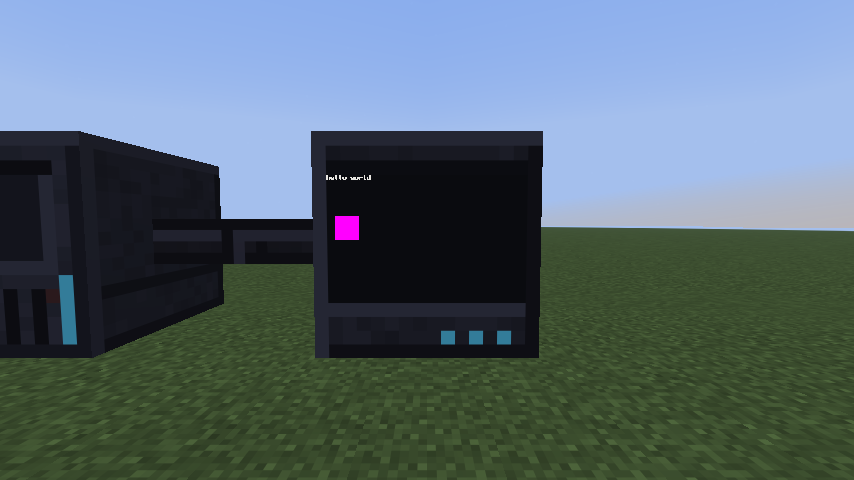 A tier 3 screen beside its case, showing text and a sixel picture.
Use
Place a screen and join it to a computer with cable, on any side but its glass. Or put one in the gold expansion slot of a tier 2 or 3 case, and it shows on the case’s front. Right-click the glass to open the screen: you see the console, and what you type goes to the computer. Right-click its back to open its slot for a Bluetooth card, which pairs the screen with a computer without a cable. The power button belongs to the computer’s case, not to the screen.
Screens are terminals: programs draw on them by writing escape sequences. See Terminal for what each tier understands.
| Tier 1 | Tier 2 | Tier 3 | |
|---|---|---|---|
| Model | VT102 | VT525 | Sixel |
| Colors | One phosphor, shown in intensities | The 16 ANSI colors | Every color |
| Graphics | no | no | yes (sixel) |
| Largest size (columns by rows) | 50 by 16 | 80 by 25 | 160 by 50 |
A screen powers on at its largest size. A program can make it smaller, and larger again up to that.
Crafting
- Tier 1: iron ingots in the corners, a glass pane above and chiseled stone bricks below the middle, redstone left and right of a chip in the middle.
- Tier 2: a tier 1 screen in the middle, glowstone dust above, below, left and right, and gold ingots in the corners.
- Tier 3: a tier 2 screen in the middle, diamonds above and below, glowstone dust left and right, and prismarine crystals in the corners.
Notes
- Several screens on one computer share one console, at the largest size every one of them can show.
- A Terminal is what the computer sees.