Disk Station
The Disk Station is a dock for disks: it formats, wipes, clones and installs them without crafting a disk alone.
Facts
| | | |—|—| | Kind | Block | | Stack | 64 | | Slots | The disk it works on, a source disk (optional), a battery, a Bluetooth card | | Power | 1 W at rest; each action costs power | | Faces | Its front faces you when you place it |
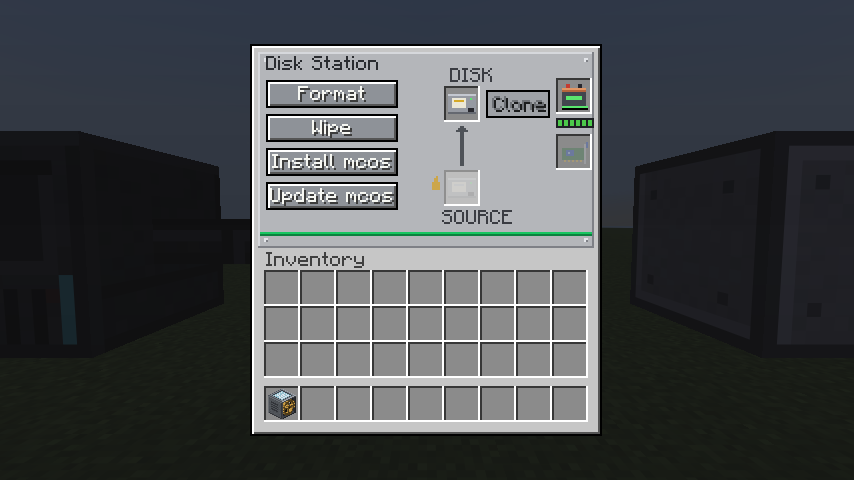 The Disk Station’s window: its switches on the left, the disk and its optional source on the right.
Use
Place the station and right-click to open it. Put a disk in the slot for the disk it works on, and press a switch:
| Switch | What it does |
|---|---|
| Format | A standard filesystem (hfs), empty: everything on the disk is gone |
| Wipe | No filesystem: a raw disk, read and written by offset. Everything on it is gone |
| Install mcos | Formats the disk, then copies mcos onto it |
| Update mcos | Writes mcos’s files over the disk’s (its /etc too); everything else stays |
| Clone | The disk becomes a copy of the source disk |
A switch is dead until the disks it needs are in. Clone needs the source disk, which is only read, never written. A clone takes the source’s format, and is refused when it does not fit: a raw disk only goes onto a disk as big. The station says how it went: Done, Missing disk, Missing source, No Power, Too big to fit, Read-only disk, or Failed.
Each action costs power, from the bus while a running computer supplies it, else from a battery in the station’s battery slot. The station takes a cable on every face but its front, and is on the bus of the computers wired to it, with its disks. The same actions are available to programs; see Disk Station and the tutorial.
You can link the station to a computer without a cable using a Bluetooth card in its last slot.
Crafting
A row of three chips; below it an emerald, a tier 1 hard disk and an emerald; below that an iron block, a piston and an iron block. The disk used in the recipe loses its files.
Notes
- The station’s disks are on the bus only while the station is.