Case
A case is a computer: a block with a motherboard inside, whose slots you fill with parts.
Facts
| | | |—|—| | Kind | Block | | Tiers | 1, 2 and 3 | | Stack | 64 | | Faces | Its front faces you when you place it | | Power | A small buffer inside, bigger at higher tiers; the rest comes from batteries |
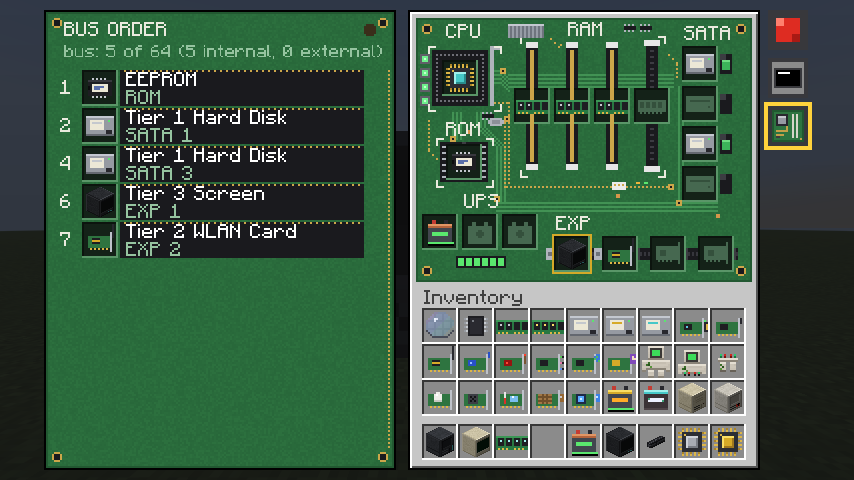 The case view is the computer’s own motherboard. Parts sit in its sockets; the bus order is on the left.
Use
Place the case and open it by right-clicking the window into the case on its back. You see its motherboard: a green board with a socket for every part. Fill it with parts by hand or by shift-clicking them in from your inventory. The power button is on the back too; sneak and right-click anywhere on the case presses it as well. The power light is green when the computer is on, and amber when it is on but its CPU has stopped.
Every tier is the same board. A lower tier has the first sockets of each kind, and the rest are greyed out, in the same places.
| Tier 1 | Tier 2 | Tier 3 | |
|---|---|---|---|
| CPU | 1 | 1 | 1 |
| EEPROM | 1 | 1 | 1 |
| Battery bays | 1 | 2 | 4 |
| RAM | 1 | 2 | 4 |
| SATA (disks) | 2 | 3 | 4 |
| Expansion (cards) | 2 | 3 | 4 |
| Screen slot | no | yes | yes |
The first expansion slot of a tier 2 or 3 case is trimmed in gold. It takes a screen as well as a card, and a screen there shows on the case’s front, so the case is a computer with its own display. A tier 1 case has no such slot: give it a screen of its own, joined by cable.
A computer needs a CPU and a battery with some charge in it to be ready to run, and its CPU runs the program on the EEPROM. The case’s other sides take cables, and a block right against the case (not against its front) is on its bus without one. The case view also shows the bus order: the devices on the computer’s bus, which you can reorder, connect, disconnect and forget.
Cards are expansion parts. The case takes any of them: redstone,
network, WLAN, Bluetooth,
sound, internet, operator,
and the motion, audio and
weather sensors. A redstone card in a case works at the case, and
faces such as front and left are named from the case’s front. See Faces.
A Bluetooth card in your hand, right-clicked on a case that has one, links the two.
The buttons
Right of every view of a computer is the same column of buttons, in the same order:
- Power, the same button as on the case’s back.
- The screen view (a little screen): the terminal. Dimmed when the computer has no screen in its slot.
- The parts view (a motherboard): the board, its sockets and the bus order.
- A golem’s hands, on a golem.
- A tab for each card that has a panel, such as a crafting card.
The view that’s open is ringed in yellow.
Crafting
- Tier 1: a row of three iron ingots, then copper ingot, note block, copper ingot, then iron ingot, redstone, iron ingot.
- Tier 2: a tier 1 case in the middle, four breeze rods around it (above, below, left and right), and gold ingots in the corners.
- Tier 3: a tier 2 case in the middle, diamonds left and right, echo shards in the four corners, a heart of the sea above and a redstone block below.
Breaking a case drops it with its parts inside.
Notes
- A computer and its parts are each one thing, by their ids: placing one you picked up moves it into the world, in creative too (it leaves your hand). A copy of one that’s in the world (creative’s Ctrl and pick block makes them) can’t be placed, and a copied part, a disk say, in another computer stays off its bus until the one in the world is gone. Nothing is given a new id.
- The CPU’s tier, not the case’s, sets how many devices the bus holds. A tier 1 CPU’s 4 are used up quickly by the case’s own parts.
- Parts that have been in a machine carry an id, and are told apart by it. See Names.
- Power is shown in watts and watt-hours. See Power.